Life Choice Notes prepared this article for work introducing PODAM, with AI editing assistance. The examples use the published product diagram and illustrate how to write a question for product support.
When two people describe a part of the same appliance, “the piece at the back” can point to different things. A numbered drawing gives the person asking the question and the person answering it a shared reference. On the official PODAM product page, look for the detailed diagram of the baby bottle sterilizer, also listed as a 젖병소독기.
Pair the number with the part name
The drawing identifies the rear filter as 11 and the rear vent as 12. Write the number and the label together when asking about either location. You could open with “I am looking at part 11, the rear filter, in your product diagram.” The support team can locate the part from that description.
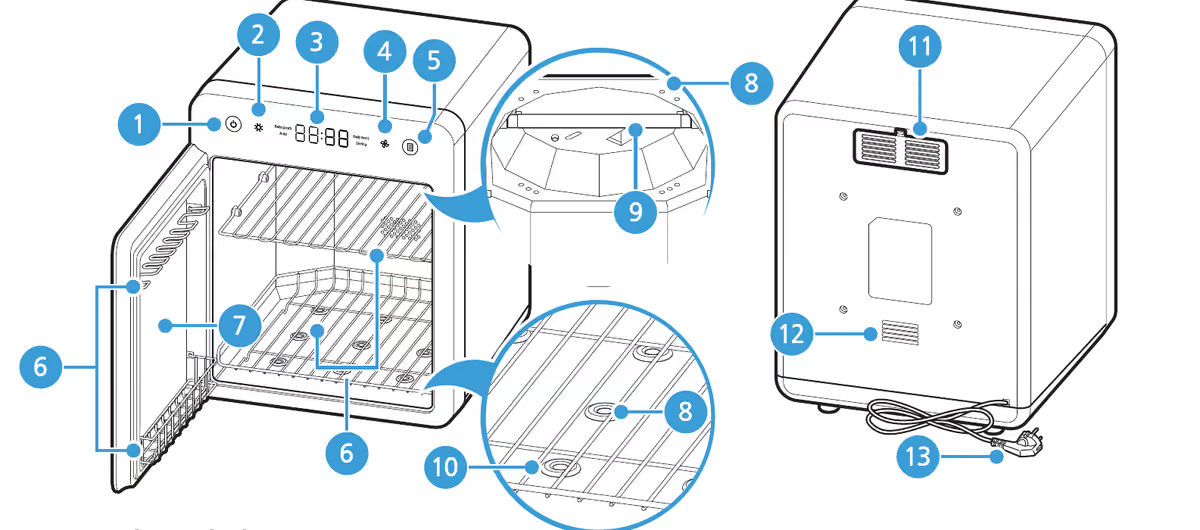
Official PODAM product diagram. The numbered labels identify locations on the appliance.
Add the position when a label covers several pieces
Callout 06 covers the lower shelf, middle shelf and door pocket. If a question concerns one of these, add its position after the callout. “Part 06, the door pocket” gives the reader enough detail to locate it without guessing which shelf or pocket you mean.
Include the model shown on the unit or its paperwork, the number and position from the drawing, and the action you want the manual to explain. For example, ask which page describes care for the door pocket on your model. Keep the diagram handy while you read the answer so you can follow the same reference.
Save the instruction with the reference
When you receive an answer, record the manual page or support reference next to the number. Someone else in the household can then locate the same part and check the instruction directly. Follow the current instructions for operation, cleaning and service.

Join the conversation
Discussion0
Join the conversation. Sign in to leave a response or reply to comments.