An independent video editor’s guide to fixing lip-sync problems after dubbing, preparing replacement audio, and creating localized talking-head videos.
1. Why Multilingual Video Localization Needs More Than a New Voiceover
One of the recurring problems in my work as a freelance video editor is that a translated voiceover can sound perfectly natural while the person on screen appears to be saying something completely different.
Recently, I started looking more closely at this problem while considering how to improve my multilingual video localization workflow. A client might provide an English product demonstration, an online course, or a corporate presentation and request Japanese, Spanish, German, or French versions. The translated script and voiceover are relatively straightforward to prepare, but the original speaker's mouth movements remain synchronized with the original language.
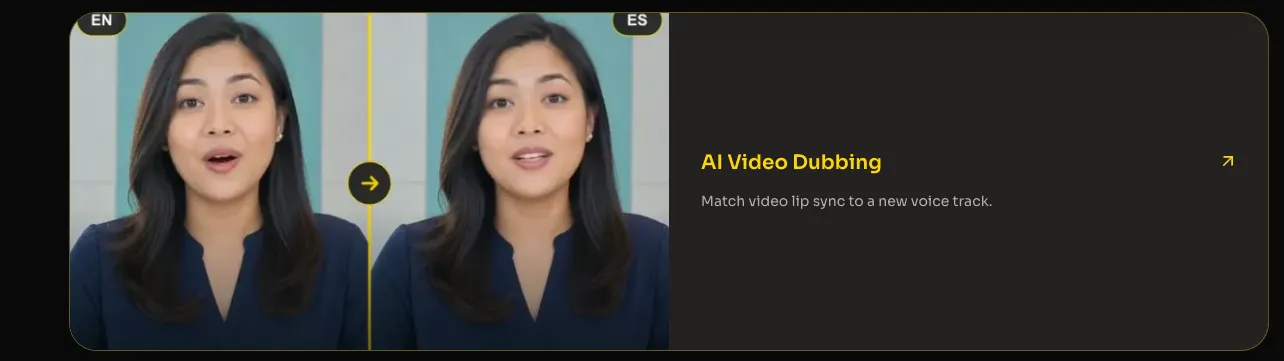
This is where FreeLipSync becomes an interesting tool to investigate. It is an AI-powered lip-sync platform that allows users to upload an existing face video and provide replacement speech audio or text, then generate video with mouth movements adapted to the new performance. Its Audio to Video Lip Sync and AI Video Dubbing workflows are particularly relevant to video editors, localization specialists, overseas marketing teams, and content creators who need multilingual versions without filming every language separately.
The important distinction is that replacing a voiceover and synchronizing a person's visible speech are two different editing tasks. FreeLipSync focuses on the latter, although the final quality still depends on the source footage, replacement audio, language, and processing conditions.
2. Why Traditional Video Dubbing Cannot Fix Lip Movements
Traditional dubbing is primarily an audio replacement process.
In a conventional editing workflow, I would normally:
Extract or mute the original dialogue.
Obtain the translated script.
Record or generate a new voiceover.
Adjust the audio timing.
Place the replacement audio on the video timeline.
Balance background music, narration, and sound effects.
Export the localized version.
This process can produce a technically correct translated video, but it does not automatically change the speaker's facial movements.
For example, an English speaker might say a relatively short sentence in three seconds. The translated Spanish version could take four seconds, while the Japanese version might require a different rhythm and several additional syllables.
Even when both audio tracks begin at exactly the same timestamp, their phonetic structures are different.
There are several reasons why this becomes visually noticeable.
Different languages use different mouth shapes
Languages do not share identical pronunciation patterns.
English, Spanish, Japanese, and German use different combinations of vowels, consonants, and syllable structures. Some sounds require visible lip closure, while others involve more subtle tongue or jaw movements.
A translated voiceover may therefore contain a completely different sequence of visible speech sounds from the original recording.
Speech duration and rhythm are not identical
Translation rarely preserves the exact length of the original sentence.
A short English phrase may become considerably longer in another language. Word stress, syllable timing, and natural pauses also vary.
Simply stretching the translated audio to fit the original video can make the voice sound unnatural without solving the visual mismatch.
Facial expressions remain tied to the original performance
A person's mouth is only one part of the problem.
The original video also contains jaw movements, cheek movements, facial expressions, and pauses associated with the original speech.
Traditional audio editing cannot reconstruct these visual elements.
This is why AI Lip Sync for Multilingual Videos is becoming an interesting part of localization workflows: instead of changing only the audio, AI attempts to adapt the visible speaking performance to the replacement voice.
3. What FreeLipSync Offers for Multilingual Video Dubbing
Before choosing a workflow, I would distinguish between two related features: Video Lip Sync and AI Video Dubbing.
They address similar problems, but their entry points are slightly different.
3.1 Video Lip Sync: Synchronizing Existing Video with New Audio
The Audio to Video Lip Sync feature is particularly relevant when the translation and voice recording have already been completed.
Its basic workflow is:
Upload an existing video containing a visible speaker.
Upload a replacement audio file or record new speech.
Generate a video with mouth movements adapted to the new audio.
Preview the generated result and download it.
The tool supports MP4, MOV, and WebM video uploads. Its audio upload options include MP3, WAV, M4A, AAC, OGG, and FLAC, according to the current tool documentation. The original audio track is replaced by the new speech performance rather than simply mixed with it.
FreeLipSync
For my localization workflow, this is the more direct option when a professional voice actor has already recorded the translated dialogue.
For example, suppose I receive:
An original English product demonstration.
A professionally recorded Japanese voiceover.
A translated Spanish voiceover.
I can treat each translated recording as a separate input and generate corresponding localized versions from the same source footage.
This avoids having to rebuild the entire video from scratch for every language.
3.2 AI Video Dubbing: A More Complete Localization Entry Point
The AI Video Dubbing feature is designed specifically for adapting existing talking videos to another language.
It offers two input methods:
Text input
Paste the translated dialogue, then select an available preset voice or an authorized cloned voice.
Audio input
Upload an already-recorded translated voiceover or record speech directly in the browser.
After receiving the replacement speech, FreeLipSync generates a new visual speaking performance with mouth movements adjusted to the selected dialogue.
No Sign-Up, No Watermark
The distinction matters when organizing a localization project.
If I already have approved voice recordings from a native-speaking voice actor, uploading audio is the more suitable route. If the translated script is ready but the voiceover has not yet been produced, the text-based workflow provides another option.
However, AI Video Dubbing should not be confused with a complete translation management system. The tool does not automatically translate, fact-check, or rewrite the original dialogue. Translation quality and linguistic review remain separate responsibilities.
3.3 What About Voice Cloning?
Another relevant feature is FreeLipSync Voice Cloning.
For projects where brand identity matters, using a consistent voice across several localized videos can be valuable.
The official voice-cloning page allows users to upload a recording or capture a voice sample. It recommends a clear recording of approximately 5–30 seconds, ideally featuring one speaker without background music or echo.
FreeLipSync
From an editor's perspective, I would consider this an optional part of the workflow rather than a requirement for lip synchronization.
A cloned voice does not automatically guarantee accurate pronunciation in every target language. Before using it in a commercial localization project, I would have a native speaker review the pronunciation, emphasis, and delivery.
4. Preparing Video and Audio Before Starting
The quality of an AI lip-sync result is influenced by the materials supplied to the tool. Uploading a poor-quality source and expecting the software to repair every problem is not a reliable production strategy.
I would prepare three things before opening FreeLipSync.
4.1 Prepare the Original Video
The source video should contain a clearly visible person who is speaking.
For this type of project, I would prioritize the following characteristics:
Video characteristic | Recommended preparation |
|---|---|
Face visibility | Keep the speaker's mouth unobstructed |
Camera angle | Prefer front-facing or slightly angled footage |
Lighting | Avoid heavy shadows across the mouth |
Resolution | Use the clearest available original |
Movement | Avoid excessive head movement |
Editing | Separate the target speaking section from unrelated scenes |
Speaker count | Prefer one clearly identifiable speaker |
The official AI Video Dubbing workflow lists MP4, MOV, and WebM as supported formats and recommends a clearly visible speaking face. It also warns that multiple speakers, cuts, occlusions, and large duration differences can reduce quality.
No Sign-Up, No Watermark
One practical recommendation I would add is to retain the original high-quality export rather than using a video that has already passed through several rounds of compression.
Compression artifacts around the lips and chin can make visual inspection more difficult.
4.2 Prepare the Translated Audio
The replacement audio is just as important as the original footage.
Before uploading, I would check:
Whether the translation has been approved.
Whether the recording contains only the intended dialogue.
Whether background music or noise interferes with the speech.
Whether the voice has consistent volume.
Whether the recording includes unnecessary silence.
Whether the speaker's emotional delivery matches the original scene.
For example, a product introduction should generally sound confident and informative. An online course might require a slower, more explanatory delivery.
If the translated audio sounds rushed, I would correct it before asking an AI model to synchronize the speaker's mouth.
4.3 Check Audio and Video Duration
This is one of the most important preparation steps.
I would compare the original speaking section with the translated audio before generating anything.
Imagine the following situation:
Material | Duration |
|---|---|
Original English speech | 32 seconds |
Spanish replacement audio | 37 seconds |
Japanese replacement audio | 41 seconds |
These durations are illustrative rather than measured product results.
They demonstrate why one original video cannot always be reused without reviewing its timing.
If the translated audio is substantially longer, I would first check whether the translation can be shortened naturally without losing meaning. If necessary, I would divide the source into logical speaking sections.
I would not automatically accelerate the voiceover just to match the original duration. That can damage natural speech rhythm.

5. How to Use FreeLipSync for Multilingual Video Lip Sync
For a project where the translated audio is already prepared, I would begin with the Audio to Video Lip Sync workflow. If the project requires choosing between translated text and audio, I would use AI Video Dubbing.
The following steps describe the official input workflow and my recommended production checks. They are not presented as results from an independently completed processing test.
Step 1: Open the AI Video Dubbing Tool
Como Fazer Vídeos da Copa do Mundo 2026 com IA — De Graça, Sem Marca d'Água | FreeLipSync
Open:
https://freelipsync.com/tools/ai-video-dubbing
The interface provides an area for uploading the original video, along with options for text input, audio upload, and browser recording.
For an existing localization project, I would select the audio-input option because the translated voiceover has already been approved.
If you have not prepared the replacement recording, you can instead use the text-input workflow.
Step 2: Upload the Original Video
Select the video upload area and choose the source footage.
The official interface lists three video formats:
MP4
MOV
WebM
After uploading, check the preview carefully.
I would pay particular attention to the following:
Is the correct speaker visible?
Is the mouth clearly distinguishable?
Does the selected section contain unnecessary scene transitions?
Does the video include other people speaking?
Is the original speaking section suitable for the translated dialogue?
If the original project is several minutes long but only contains a 30-second section that needs localization, I would cut out that section in my editing software first.
This makes it easier to identify problems later.
Step 3: Upload the Translated Audio
VTuberデビューをAIリップシンクで加速する:無料ツールで本格アバター動画を作る方法【2026年版】 | FreeLipSync
Choose Upload Audio and select the translated recording.
FreeLipSync's AI Video Dubbing interface lists MP3, WAV, M4A, and WebM as supported audio inputs. The separate Audio to Video Lip Sync page also documents additional formats, including AAC, OGG, and FLAC.
No Sign-Up, No Watermark+1
Once the audio is uploaded, I would play it back before generating the video.
This is a small step, but it prevents several avoidable mistakes, such as uploading the wrong language version, using an outdated voiceover, or selecting an incomplete recording.
For projects involving several markets, I would use clear filenames:
Product_Demo_English.mp4Product_Demo_Spanish.wavProduct_Demo_Japanese.wavProduct_Demo_German.wav
Consistent file naming becomes especially important when several language versions are being processed.
Step 4: Start the Lip-Sync Generation
After checking the video and audio inputs, start the generation process.
The official workflow describes the system as adapting the speaker's mouth movements frame by frame to the replacement speech.
No Sign-Up, No Watermark
At this stage, I would avoid making assumptions about how long processing should take. Processing time can vary with the input and service conditions.
For a professional project, I would also avoid sending an entire batch of language versions into production before reviewing a short representative section.
My recommendation is to begin with one short speaking segment. If the result is visually acceptable, continue with the remaining localized versions.
Step 5: Preview the Generated Video
How to Generate a Free AI Lip Sync Video (No Sign-Up Required) | FreeLipSync
Once generation is complete, preview the result in the browser.
This is where I would spend most of my quality-control time.
I would not judge the output based on whether the mouth moves. I would examine whether the movements make sense in relation to the actual speech.
My review checklist would include:
Do the lips close naturally during sounds that require lip closure?
Does the mouth open at the appropriate moments?
Are there visible delays between speech and mouth movements?
Does the speaker's jaw move unnaturally?
Are facial expressions consistent with the new dialogue?
Are there noticeable visual changes between consecutive frames?
I would also compare the new video against the original source rather than evaluating the generated version in isolation.
Step 6: Download and Finish the Video in Your Editing Software
After reviewing the output, download the generated video.
The official workflow indicates that watermark-free downloads are available, with the download and resolution conditions depending on the account and plan.
No Sign-Up, No Watermark+1
I would then bring the generated file back into Premiere Pro, DaVinci Resolve, or another editing application.
My final editing pass would cover:
Checking synchronization at the beginning, middle, and end.
Matching the generated clip to the original project timeline.
Restoring background music and environmental sound where appropriate.
Checking subtitles against the translated dialogue.
Correcting color and visual continuity if necessary.
Exporting the final language-specific version.
I would keep the original project file and generated localized clips separate. This makes later revisions easier if a client changes a sentence or requests another language.
6. What Should Editors Check When Working with Different Languages?
A lip-sync result that looks acceptable in one language does not necessarily look equally convincing in another.
This is particularly important for multilingual production because each language introduces different pronunciation patterns and speech rhythms.
I would evaluate five aspects before approving a localized video.
6.1 Mouth Visibility and Pronunciation
YouTube Skills: How to Become a Pro at Speaking on Camera
The visibility of the speaker's mouth is one of the first things I would inspect.
Some sounds involve clear lip closure, while others require the lips to remain open or move into different shapes.
For example:
English contains visible lip movements for sounds such as /p/, /b/, and /m/.
Spanish has its own combinations of vowels and consonants, with different patterns of mouth movement.
Japanese uses relatively regular syllabic timing, but its vowel sequences and consonant combinations still differ from English.
German contains consonant combinations that may produce different visible articulation patterns.
An AI model may adapt the mouth movement to the new audio, but that does not mean every phoneme will be represented perfectly.
I would pay particular attention to short words and consonants at the beginning and end of sentences because synchronization errors can be easier to notice there.
6.2 Speaking Rhythm and Syllable Duration
Different languages communicate the same meaning using different numbers of syllables.
For example, an English marketing sentence might be relatively short, while its Japanese translation may require a longer spoken expression.
This affects the timing of the video.
When reviewing the output, I would check whether the speaker appears to finish speaking at the same time as the audio.
If the translated voice continues after the mouth has stopped moving, or the mouth continues moving after the sentence ends, the result needs further attention.
6.3 Speech Speed
Translation teams sometimes make the mistake of trying to preserve the exact duration of the original recording.
However, a translated sentence should sound natural in its own language.
I would rather slightly restructure a sentence than force a voice actor to speak unnaturally quickly.
A useful approach is to divide longer dialogue into smaller sections and review the timing of each section independently.
6.4 Pauses and Breathing
Pauses are easy to overlook during localization.
A speaker might pause briefly after introducing a product feature, take a breath before explaining a technical detail, or leave a longer gap before the final call to action.
If the replacement audio removes these pauses, the new visual performance may feel noticeably different from the original scene.
I would compare the pause structure of the translated audio with the original presentation and make sure the resulting video does not contain unnecessary gaps or abrupt transitions.
6.5 Facial Expressions and Emotional Consistency
What if We Could Reverse Parkinson's Disease? | Bayer | Bayer | Pharmaceuticals
Lip synchronization is not just about opening and closing the mouth.
A person explaining a complicated technical feature should not suddenly appear to be smiling excessively or displaying expressions that contradict the dialogue.
When checking the generated output, I would examine:
Whether the face remains visually consistent.
Whether the jaw and cheeks move naturally.
Whether the eyes and surrounding facial features remain stable.
Whether the speaker's expression matches the emotional tone of the new audio.
This is particularly important for interviews, educational content, and corporate communication, where viewers pay attention to the speaker's overall expression rather than just the mouth.
7. Where Can AI Lip Sync Help in Professional Video Production?
I see several practical applications for AI Video Dubbing beyond simply translating promotional videos.
7.1 Product Demonstration Videos
Product demonstration videos are frequently reused across different markets.
A software company might record one English presentation and subsequently need Japanese, Spanish, and French versions.
Without lip synchronization, the translated audio can sound disconnected from the presenter.
An AI lip-sync workflow offers a way to adapt the speaking footage without arranging another complete recording session for every language.
For editors, this can reduce the amount of repeated production work, particularly when the presenter appears on screen for most of the video.
7.2 Online Courses and Educational Content
Online courses often contain lengthy explanations delivered directly to camera.
If an educational platform wants to expand into another market, it may need to prepare translated narration for dozens of lessons.
AI Lip Sync for Multilingual Videos can help adapt the visible speaking portions to the translated audio.
However, I would not automatically process an entire course as one continuous video. I would divide the content into lessons or individual speaking sections and check each output separately.
Technical terminology, mathematical explanations, and specialist vocabulary should also receive additional linguistic review.
7.3 Enterprise Training and Internal Communication
Videoaula o Que é? | Wonder Produções
International companies often reuse the same onboarding materials, compliance explanations, and internal announcements across different offices.
For example, a company might prepare one training video for employees in the United States and subsequently distribute localized versions to teams in Japan and Germany.
The ability to reuse existing presenter footage is particularly useful when the original speaker is a senior manager or subject-matter expert who is difficult to schedule for repeated recordings.
Nevertheless, I would recommend additional review for compliance-related content. The translated dialogue must remain accurate, and any synthetic alteration should be appropriately disclosed.
7.4 Overseas Marketing and Social Media Videos
Short-form marketing content is another interesting application.
Marketing teams often produce multiple versions of the same campaign for TikTok, Instagram Reels, YouTube Shorts, and regional advertising channels.
A localized spokesperson video can help maintain a consistent visual identity while adapting the spoken content to different audiences.
For instance, the same founder introduction could be prepared in English, Spanish, and Japanese without requiring the founder to record three separate performances.
However, I would still review the cultural suitability of the translation. A technically synchronized video is not necessarily an effective localized advertisement.
8. Limitations to Consider Before Using FreeLipSync
AI lip synchronization can reduce manual editing work, but I would not treat it as a complete replacement for professional post-production.
There are several limitations worth understanding.
8.1 Different Languages May Produce Different Results
Multilingual support does not mean identical synchronization quality across every language.
The pronunciation structure, recording quality, speech speed, and audio characteristics can all influence the result.
Even when two translated recordings have similar durations, their phonetic structures may be substantially different.
My recommendation is to review each language version independently instead of assuming that an acceptable English-to-Spanish result guarantees an equally convincing English-to-Japanese result.
8.2 Face Angle and Mouth Obstruction
Enterprise AI Platforms That Deliver Results
Front-facing footage is generally a more practical starting point than extreme side-profile footage.
The difficulty increases when:
The speaker frequently turns away from the camera.
The mouth is covered by a microphone or hand.
Hair or other objects obscure the lower face.
The video contains rapid camera movements.
The face is very small in the frame.
FreeLipSync's own AI Video Dubbing guidance recommends a clearly visible face and identifies occlusion and multiple speakers as potential quality challenges.
No Sign-Up, No Watermark
I would therefore select the clearest speaking footage available before processing.
8.3 Original Video Quality Still Matters
An AI model cannot always recover visual details that are missing from the original material.
Low-resolution footage, heavy compression, motion blur, poor lighting, and inconsistent framing can all make the generated output harder to evaluate.
For professional projects, I would use the original camera export whenever possible.
8.4 Long Videos Require More Planning
A long training session or product presentation should not necessarily be treated as one large lip-sync task.
The official plan limits are relevant here.
According to the current pricing page:
Plan | Listed video duration | Other relevant limits |
|---|---|---|
Free | Up to 20 seconds | 133 text characters; one video at a time |
Starter | Up to 3 minutes | 20 Pro Videos per month |
Pro | Up to 60 minutes for standard lip sync | Unlimited Pro Videos |
The current listed subscription prices are $9.90/month for Starter and $69.90/month for Pro. The page also lists one-time purchase options. Limits and prices should be checked again before committing to a project.
Free, Starter, Pro, and Enterprise
For a localization team, this means calculating the number of required outputs and their durations before choosing a subscription.
A free account is suitable for exploring short examples, but it is not a substitute for planning the requirements of a large production project.
8.5 Human Quality Control Remains Necessary
I would never approve a generated localized video solely because the mouth movements appear to match the audio.
There are other things to consider:
Is the translation accurate?
Is the speaker's identity represented appropriately?
Does the generated face remain consistent?
Are there unnatural transitions?
Does the audio contain pronunciation errors?
Does the final video comply with the client's disclosure requirements?
FreeLipSync also advises users to upload only authorized footage, voices, music, and scripts, and to disclose synthetic alterations where viewers might otherwise mistake them for authentic recordings.
No Sign-Up, No Watermark
9. Is FreeLipSync Worth Adding to a Professional Localization Workflow?
From my perspective as a freelance video editor, AI lip-sync technology is most useful when it addresses a specific production problem rather than being treated as another general-purpose video effect.
FreeLipSync has two particularly relevant workflows:
Audio to Video Lip Sync: More suitable when the translated voiceover has already been recorded and approved.
AI Video Dubbing: More suitable when I want to work from translated text or an existing dubbed audio track within a dedicated localization workflow.
I would use these tools to handle the visual synchronization stage, while retaining conventional editing software for timeline management, subtitles, audio mixing, color correction, and final delivery.
There are also situations where I would still recommend traditional recording. For example, an advertisement featuring substantial body movement, multiple speakers, or emotional interaction may benefit more from a new localized filming session than from attempting to reconstruct the original performance.
The biggest advantage of this type of AI workflow is the possibility of reusing existing footage. Instead of coordinating multiple recording sessions, a localization team can start with one source video and prepare separate language versions using approved replacement audio.
That is a meaningful production option, especially for small editing teams and businesses that need to distribute content internationally.
My conclusion is that FreeLipSync is worth evaluating as part of a multilingual video production toolkit, particularly for talking-head content, product demonstrations, and training materials. However, I would make the final decision based on the quality of a short representative sample rather than relying on feature descriptions or assumptions about multilingual performance.
The goal should not be to eliminate the editor from the process. It should be to spend less time correcting repetitive synchronization problems and more time improving the overall quality of the localized video.
10. Frequently Asked Questions
1. Can FreeLipSync synchronize an existing video with translated audio?
Yes. Its Audio to Video Lip Sync and AI Video Dubbing workflows allow users to upload existing talking footage and provide replacement audio. The system then generates adjusted mouth movements to match the new speech.
No Sign-Up, No Watermark+1
2. Does FreeLipSync automatically translate videos into other languages?
No. Users need to prepare the translated dialogue themselves or use an external translation workflow. FreeLipSync handles speech generation or audio input and visual lip synchronization, rather than automatically translating and verifying the original content.
3. Which video and audio formats does FreeLipSync support?
The AI Video Dubbing interface lists MP4, MOV, and WebM for video, and MP3, WAV, M4A, and WebM for audio. Its separate Audio to Video Lip Sync tool also lists AAC, OGG, and FLAC. Check the relevant upload interface for current format and size restrictions.
No Sign-Up, No Watermark+1
4. Can I use FreeLipSync for commercial video localization?
The platform offers paid plans and describes commercial applications such as marketing and training videos. However, users should check the applicable terms and usage rights for their particular plan and output. You should also obtain permission to use the original footage, voice, and other uploaded materials.
5. Is FreeLipSync suitable for long multilingual training videos?
It can be considered for this purpose, but the appropriate plan and processing workflow matter. The current pricing page lists up to three minutes per video for Starter and up to 60 minutes for standard lip sync with Pro. For longer projects, I would divide the material into manageable sections and review each language version individually.
Free, Starter, Pro, and Enterprise
Official resources
Editorial note: Product features, file formats, and plan limits in this article are based on the official pages available on November 20, 2026. The workflow recommendations are professional editing suggestions, not claims of independently verified processing results.
Join the conversation
Discussion0
Join the conversation. Sign in to leave a response or reply to comments.